
How do I edit or resend a participant's invitation email?
After the invitations are sent, a participant sometimes doesn't receive their invitation email, or deletes it by mistake.
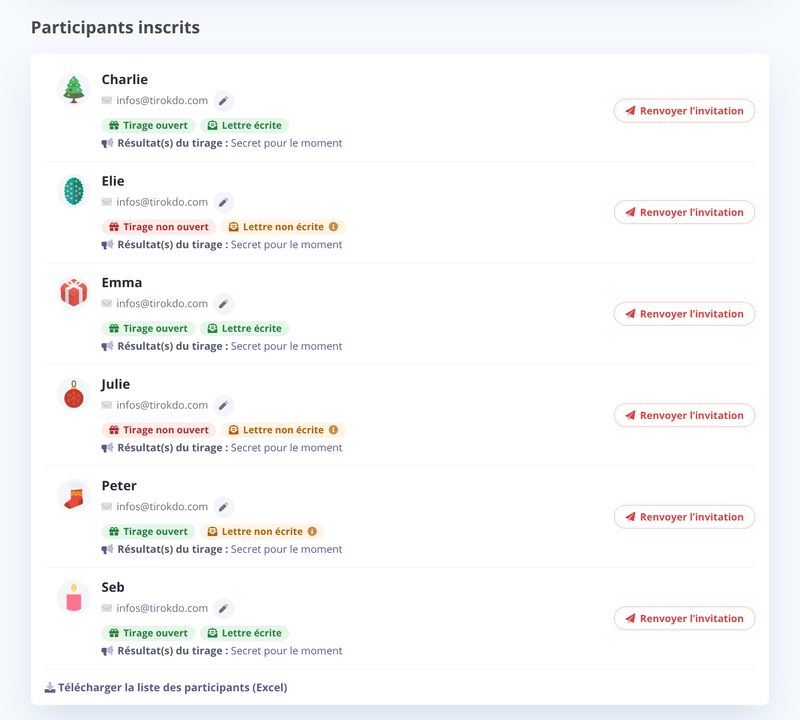
- 1. Check and fix the participant's email address if needed, with the pencil icon next to their email
- 2. Resend the invitation with the Resend invitation button
The list also shows you who has opened their draw and written their wishlist.
- Some spam filters put My Secret Santa emails (based on very different criteria) in the Spam / Promotions / Updates folders. Ask the recipient to check, then resend the email if needed.
- Other spam filters, rarer and very strict, require a captcha check (e.g. Mailinblack, SpamEnMoins): in that case, ask for the address confirmation#at#my-secret-santa.org to be added to the allowlist.
- Finally, a very small number of company email systems block My Secret Santa emails entirely. If so, send us your domain name (the part after the @): we can sometimes turn on a special setup to get around the block.
The Download the participant list (Excel) link, below the list, gives you each participant's personal link, which you can send them through any channel you like (without opening it yourself, of course
Updated on: 15/10/2026
Thank you!